
Bringing Image Optimization to Ghost v5 Solo
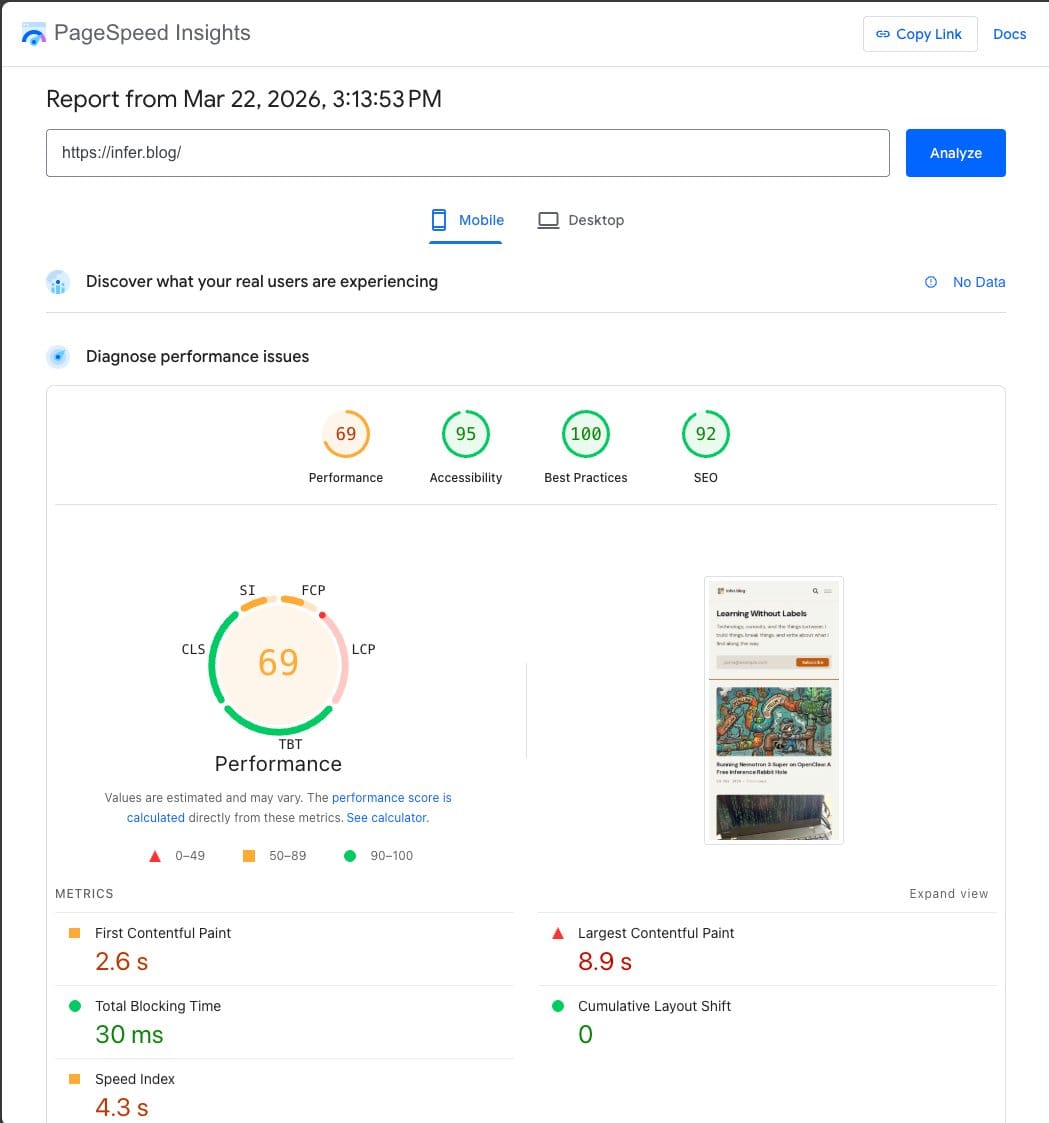
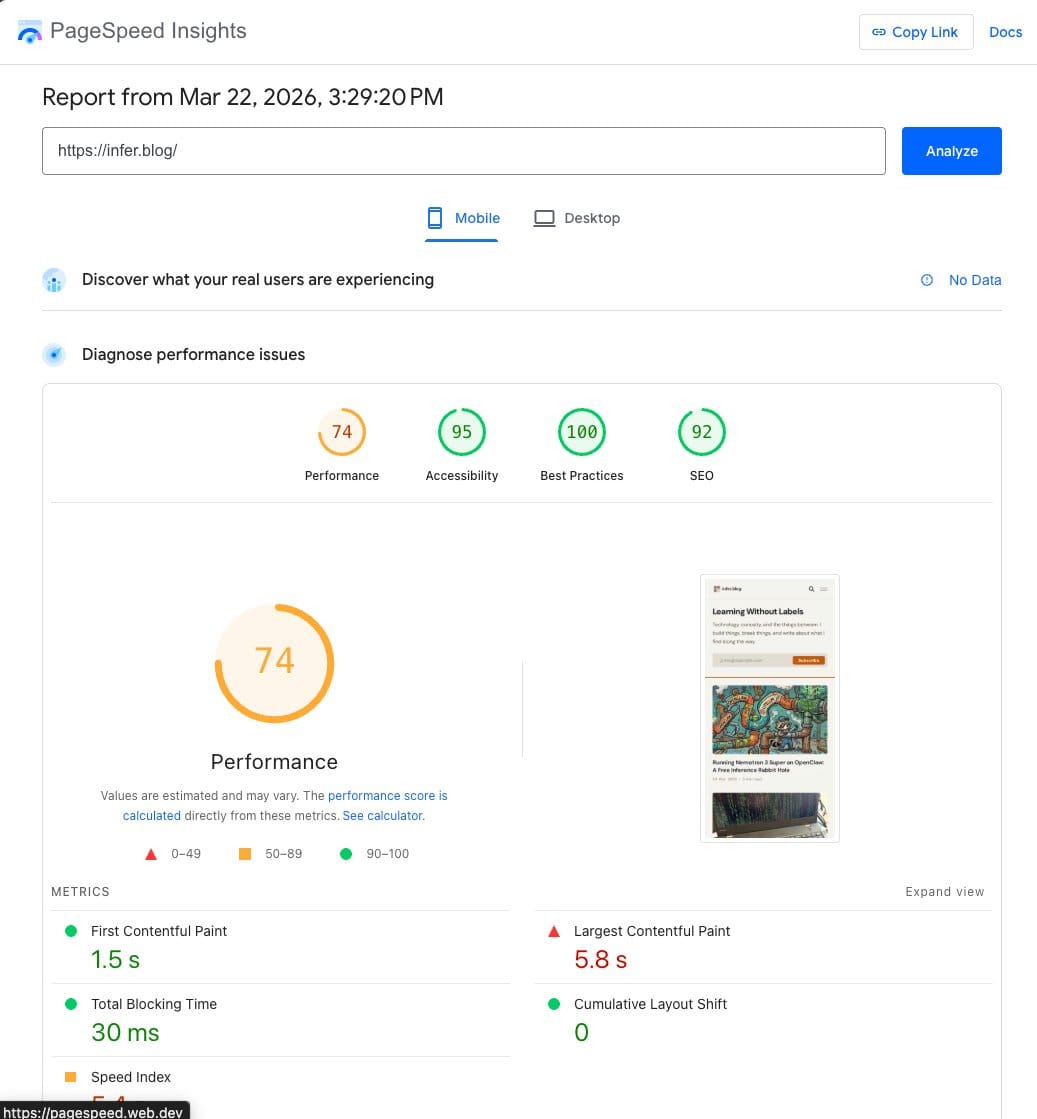
Solo serves full-size images because it's missing srcsets. I built a Cloudflare Worker that rewrites image URLs at the edge — format conversion, compression, width capping — without forking the theme. Mobile PageSpeed went from 69 to 74, FCP dropped from 2.6s to 1.5s.

TL;DR: Ghost's Solo theme serves full-size images because it's missing proper srcsets — a known, documented issue. I built a Cloudflare Worker that rewrites image URLs at the edge, converting formats, compressing, and capping widths without forking the theme. Combined with some free Cloudflare settings tweaks, mobile PageSpeed went from 69 to 74, FCP dropped from 2.6s to 1.5s, and desktop hit 97. Worker is on GitHub.
One of the things I've been enjoying about this self-hosting project is how every layer has something worth digging into. The blog runs on Ghost v5, self-hosted on Coolify, behind Cloudflare's free CDN, with the Solo theme and Code Injection overrides for the design. Total hosting cost beyond Google Fiber: $0.
After getting the deployment solid and the design right, I wanted to see how the whole thing actually performed. Not because it felt slow — it didn't. I just wanted to know where the edges were. PageSpeed Insights said 69 on mobile with an 8.9-second Largest Contentful Paint. Ghost's server was responding in 2ms. The CDN was caching fine. So where was all that time going?
Cathy Sarisky at Spectral Web Services mapped this out in March 2024. Solo is missing srcset attributes on most of its images — the logo, the hero, and the featured images all load at full original size regardless of the display context. Ghost's editor images get automatic responsive handling, but everything outside the editor depends on the theme doing it right. Solo doesn't.
Cathy fixed it in a theme fork. Homepage images dropped from 795KB to 141KB. She submitted PR #9 to TryGhost/Solo. It hasn't been merged.
I'm using Solo with Code Injection CSS overrides and wanted to keep that clean separation — no theme fork. Which meant the fix needed to live somewhere else. Cloudflare was already sitting in front of the site. Could it handle this at the edge?
Building the Worker
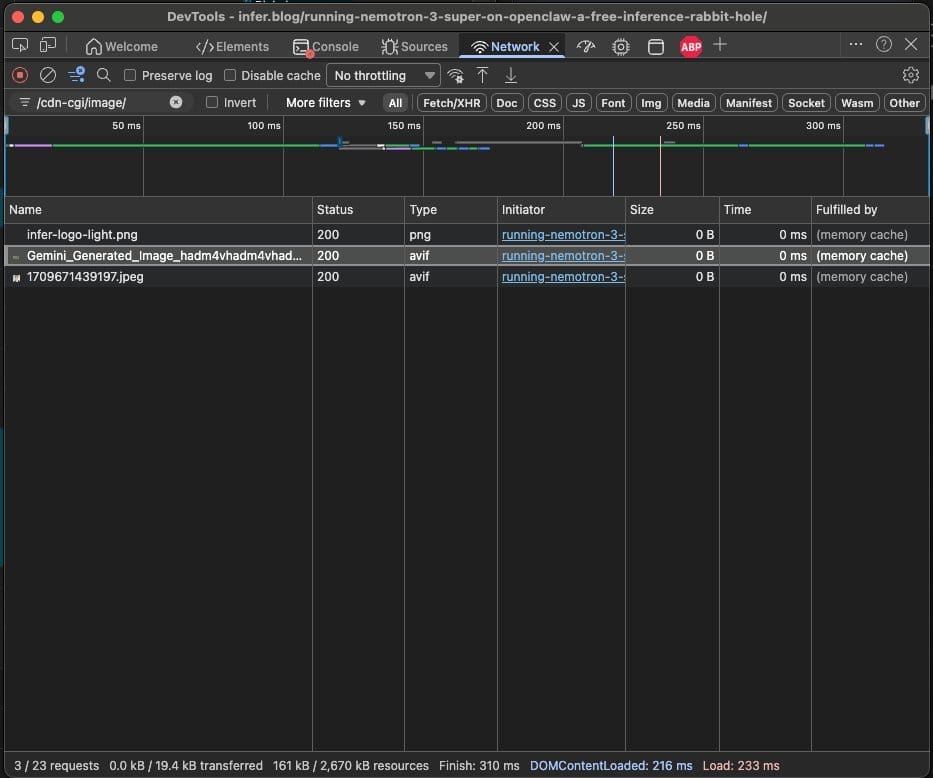
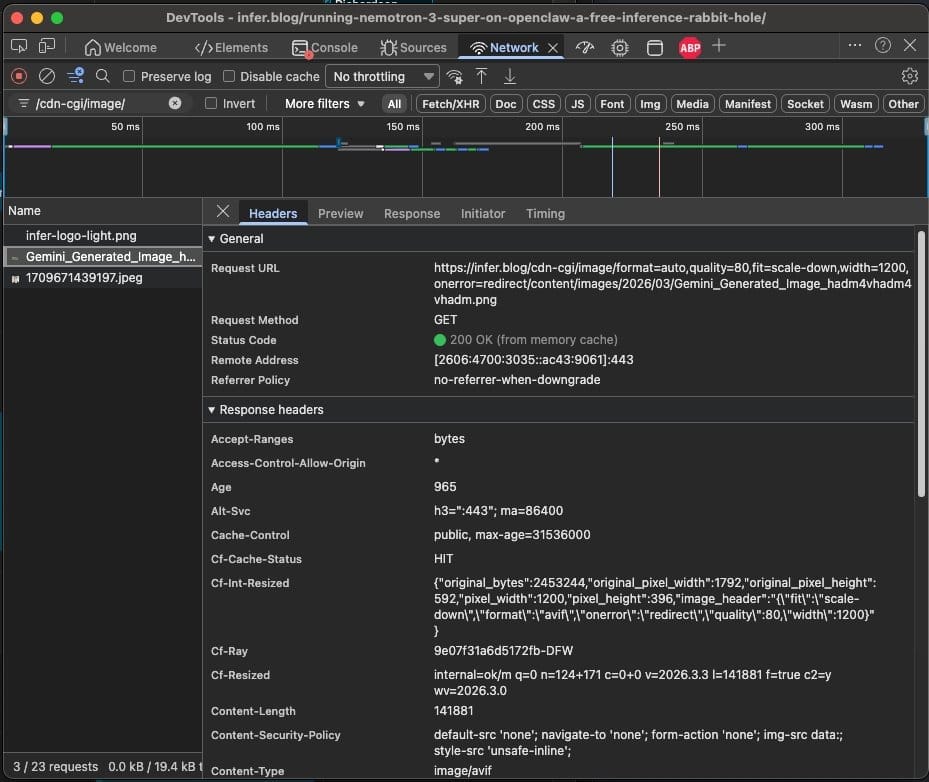
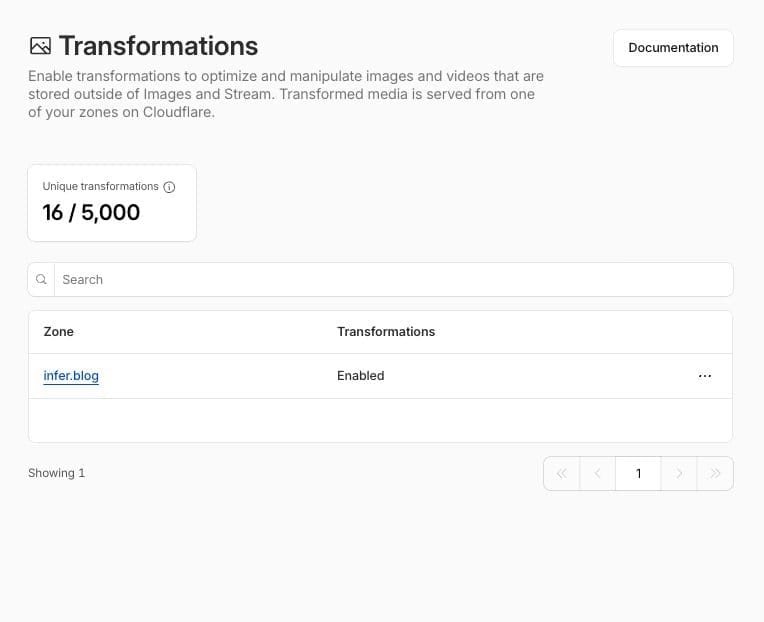
Cloudflare's free plan includes Image Transformations — 5,000 unique transformations per month at zero cost. Request an image through /cdn-cgi/image/format=auto,quality=80,width=1200/your-image.jpg and Cloudflare converts it to WebP or AVIF, compresses it, and caches the result at the edge. Each unique image+params combo is billed once regardless of how many times it's requested. For a personal blog, you'd burn maybe 3% of the free tier.
The concept: a Cloudflare Worker that intercepts HTML responses and rewrites every <img> tag to route through that path. Ghost doesn't know it's happening, and the theme doesn't change — the browser just receives HTML pointing to optimized images.
Three other Ghost self-hosters had already documented similar approaches — Vortexmind built a Ghost-specific Worker, Stanislas Music used HTMLRewriter on his Ghost blog, and Mecanik documented the pattern for WordPress. People had done this before. I needed to combine the pieces and handle some Ghost-specific quirks — like stripping Ghost's internal /size/w{N}/ resize path so Cloudflare works from the original image instead of compressing an already-compressed version.
Opus did the research and wrote the code. I directed the approach, made sure I understood the plan, and did the final check against the docs before we built anything. I've worked with CDNs and web infrastructure enough over the years to follow the technical decisions — I just needed Opus to handle the volume of reading and writing.
The part where reading the docs paid off
The initial spec used Cloudflare's cf.image Worker API for image processing. It looked clean. Then I told Opus to go read the actual primary reference docs before writing a single line of code.
Three things were off. format: "auto" doesn't work the way you'd expect in Workers — you have to manually parse the browser's Accept header. The onerror=redirect fallback isn't supported in Workers. And Cloudflare warns against running cf.image on zone-wide routes.
All three pointed at the same thing: cf.image was the wrong tool. Drop it, and the architecture gets simpler. The Worker only rewrites HTML. Cloudflare's built-in /cdn-cgi/image/ endpoint handles image processing natively — format=auto, onerror=redirect, all of it. Two systems, one job each. Ended up being a better design than what we started with.
That extra pass through the docs caught all three before anything went live. Without it, we'd have shipped a Worker that silently served unoptimized JPEGs with no fallback.
Cloudflare settings worth knowing about
After the Worker, I went through most of the free-tier Cloudflare settings to see what else was available. Arjen Karel's Core Web Vitals guide was the best resource I found — covers every setting with reasoning.
Cloudflare Fonts was the biggest surprise. One toggle, and it rewrites Google Fonts to serve from your own domain instead of fonts.googleapis.com. That cross-origin font request was costing 750ms of render-blocking time. After enabling it, FCP dropped from 2.6s to 1.5s. One setting.
Email Obfuscation was on by default — Cloudflare injects a render-blocking script that "protects" email addresses with a single-byte XOR cipher any scraper can reverse in one line of code. Turned it off.
Speed Brain uses the Speculation Rules API to prefetch pages when a user is about to click a link. Makes second-page navigation feel instant on Chromium browsers, and there's nothing to configure.
Rocket Loader stays off — it blocks bfcache and hides scripts from the browser's preload scanner, which is the opposite of what you want.
Where it landed
I don't have a pre-Worker baseline — deployed it before running PageSpeed. Next time I'll grab a before number. But here's the before and after for the Cloudflare settings changes, with the Worker already running:
| Metric | Before settings | After settings |
|---|---|---|
| Mobile score | 69 | 74 |
| Desktop score | 94 | 97 |
| First Contentful Paint | 2.6s | 1.5s |
| Largest Contentful Paint | 8.9s | 5.8s |
| Render-blocking time | 1,930ms | 320ms |
| Total page weight | 1,327 KiB | 942 KiB |
The ceiling
Mobile is 74. Desktop is 97. Everything left to squeeze out would mean real work — forking the theme to strip Ghost's Portal and Sodo Search JavaScript (483 KiB of React that loads on every page for the membership popup and site search). John O'Nolan acknowledged the weight, noting they've considered HTMX as a lighter path forward.
For a small blog, forking the theme to shave JS is overkill. The Worker and Cloudflare settings got the site to a good place. If Ghost ships lighter bundles down the road, that number goes up for free.
The Worker code, deployment instructions, and a detailed README are on GitHub.
AI attribution
Opus wrote the code, did the research, read the docs, and drafted this post. I directed the architecture, made sure I understood every decision, and told Opus to verify claims against the primary sources before building. Edited by me.
Daniel Soteldo is COO and Co-Founder of Revelus Dermatology in Austin, TX. He writes about the things he finds interesting — including the problems he solves along the way — at infer.blog.